
How to disable or enable Startup Applications in Windows Computer
When we start to open computer, it will work very slowly if so many Startup programs are running. So, we need to disable unnessary programs at the startup time. And, some neccessarty programs are not running at the startup time. For example, antivirus software. At that time, we need to enable the programs. The following is the way to enable or disable the programs:
1. Press Windows and R Key together. The Run Box will be appeared.
2. Type control in it and click OK. Control panel screen will be appeared.
3. Click System and Security.
4. Click Administrative Tools.
5. Click System Configuration and the following screen will be appeared.
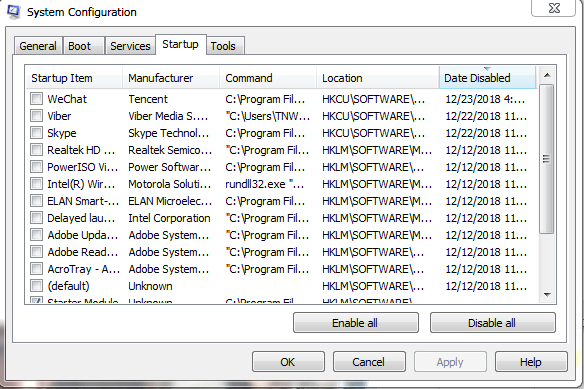
6. Click Startup Tab.
7. If you want to disable the unnecessary applications, unselect those and click Apply and Ok.
8. If you want to enable the necessary applications, select those and click Apply and Ok.
Please look at the video


Comments:
No comment.