The most viewed posts

Contact Me

About Me

Myanmar font and keyboard for Windows

Registry Reviver

IT Support & Endpoint Management

Digital Platforms & Web Solutions

How to clean up Windows Computer

Driver Booster

CCleaner

About Desktop Icons in Windows Computer

The most viewed items

Dell Inspiron 5559

SONY Playstation Portable

HP ProBook 430

Laptop RAM

External Hard Disk

Laptop

Desktop Hard Disk

Please login to start chat

ZilaStar ICT Dec 26 2018, 13:20:29

How to check system information in Windows PC

Checking by DirectX Diagnostic Tool

1. Press Windows and R keys together at the same time. Run Box will be appeared.

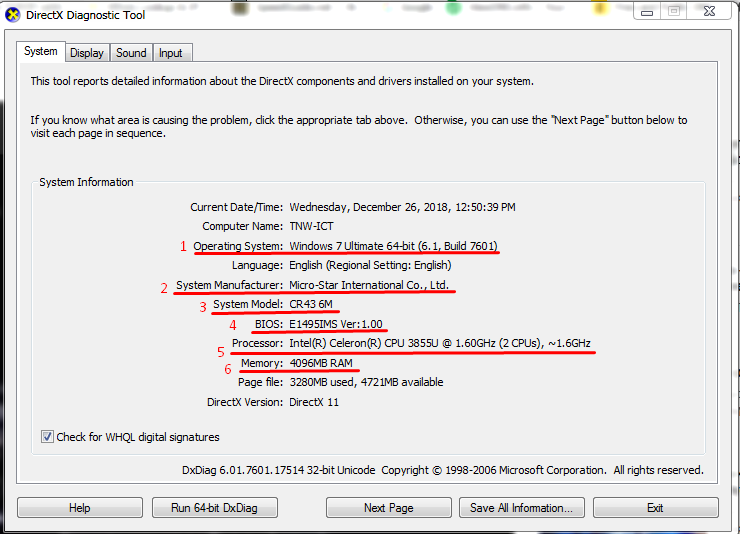
2. Type dxdiag in the run box and click Ok. DirectX Diagnostic Tool screen will be appeared.

3. You can check the system information of the computer as the following picture.


Another way is typing msinfo32 in the run box and click OK. Then, system information screen will be appeared.

To Contact
🙏 About Me
📜Terms and Conditions