
ZilaStar ICT
Dec 9 2018, 09:19:33
How to change screen resolution in Windows 10
Sometimes, we may face the problem that the computer screen is bigger or smaller than normal although all drivers have been installed. That may be because of screen resolution in our computers. The following is the way how to change screen resolution in windows 10 :
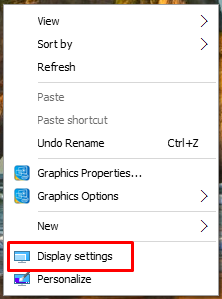
1. Right click on the windows screen and click display settings as shown in below picture.
2. Click down arrow head under Display resolution and the following screen will be appeared.
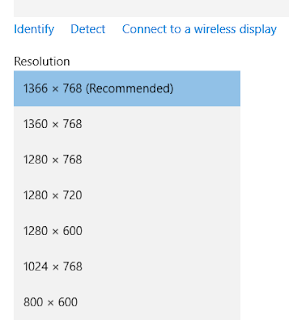
3. Choose the resolution that is compatible with your computer as show in above picture and click Apply.


