
Checking DNS (domain name system)
We can use nslookup command to check dns (domain name system). The following is the way to check.
In windows,
1. Press Windows + R keys together. Run Box will be appeared.
2. Type cmd in the run box and click OK. Command Prompt will be appeared.
3. Type nslookup in the command prompt and press enter.
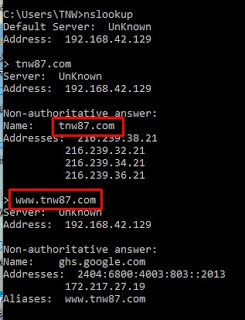
4. Then, type example.com or www.example.com and press enter. If your dns is working, you will see Name and Address as the following picture.
In Linux,
1. Open new terminal and type nslookup and press enter.
2. Then, type example.com or www.example.com and press enter. If your dns is working, you will see Name and Address.
Using the third party software/website to check dns
We can check our dns by using third party website. If you want to check, please click here.


